ERICK'S BLOG
  • Home
  • Music
  • Blog
  • Apps
    • Mortgage Calculator
  • Windchill
    • Windchill Customizations
    • E.P.L.E.S.
    • Export Released
    • Document Exporter
    • Document Worker
    • Property Checker
    • Windchill Business Analytics >
      • Part 01 - Program Logic
      • Part 02 - Getting Data with SQL Queries
      • Part 03 - Automating SQL Queries
      • Part 04 - Converting SQL Results to XML
      • Part 05 - Data Processing and Manipulation
      • Part 06 - Displaying XML in HTML
      • Part 07 - Auto Updating Displayed Data
      • Part 08 - Hosting Webpage with an Existing Apache Installation
      • Part 09 - Running Multiple Queries In Sequence
      • Part 10 - Calculating Data Trends
      • Part 11 - Making It Modular
    • Windchill Quick View
  • PowerShell
    • Blog & Examples
    • Excel Reference
  • Contact

How to Install Windchill 13 with SQL Server 2022 - Part 4: Installing Solr Server

5/10/2024

0 Comments

 
Picture
In Part 3, we installed Windchill with the Solr Client.  The last required piece for Solr to work is the Solr Server.  For Part 4, we are going to install it.

Prerequisites

If you are doing this right after Part 3, kill all of those java.exe apps and the httpd.exe app that is running.  If you don't understand, restart the server and they will be gone when you log back in.  We don't want Windchill running during this install.

Installation or Solr Server

  1. Go to the extracted CPS disc from the Windchill install.  Open setup.bat.
  2. Click OK on the PTC Solution Installer prompt.
  3. Click Next.
  4. You know the drill.
  5. Check the box, Next.
  6. You will notice the Update Existing Installation option is now available to us.  Good because we aren't going to use it this time.  Select New Product Installation and click Next.
  7. Select Standalone Product or Component at the very bottom under the Standalone Products section.  You will notice everything else get greyed out when you check this box.  Now you see why we couldn't do this as part of the greater Windchill install.
  8. Select Windchill Index Search Server.
    1. The other options are here if you wanted to separate Apache and the Database from the Windchill server.  Since we went with a single server, we did not need to go this route.  It is recommended to install Solr Server on a separate server for production.  I have not had a customer willing to give a whole other server just for Solr so I have always installed it on the Windchill server.  No issues so far.
    2. Click Next.
  9. Installation Name still does not matter.  Click Next.
  10. Change the Base Installation Directory to a location outside of Windchill.  The installer will give you an error if you try to install in the Windchill directory.  It looks for an existing PSI folder and complains if it finds one.  You could temporarily rename the PSI folder, install and rename it back if you wanted but why?  Change it to a directory higher and be done with it.
  11. Enter the same Solr Admin credentials you made during the Windchill Install.
  12. You should not have any trouble with staging here since the Index Server happens to be part of the CPS patch this time.  Click Next.
  13. Double check the Installation Overview.  Click Install.
  14. More good greed check marks.  Click Done.
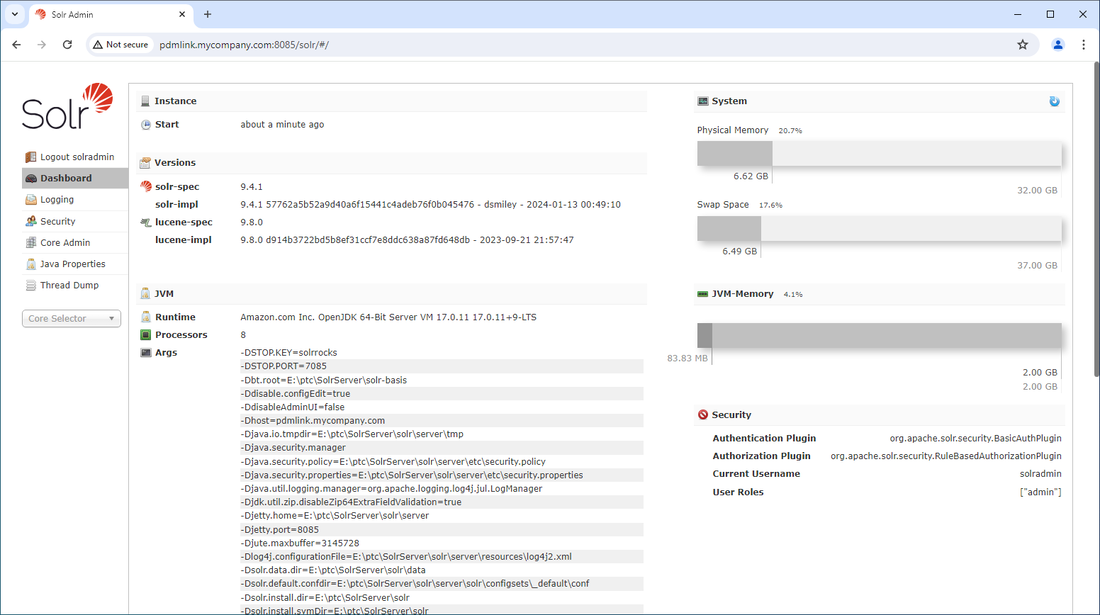
  15. Go to the url http://<your fully qualified hostname>:8085/solr and login with the same Solr admin account.
  16. You should now see the Solr Dashboard.

Next Steps

Solr Server is now installed.  I can't prove to you that it works just yet but you will see.  Part 5 will deal with setting up services as everything runs as a foreground app right now.
0 Comments

Your comment will be posted after it is approved.


Leave a Reply.

    Author

    Erick Johnson

    Archives

    August 2025
    June 2025
    May 2025
    May 2024
    July 2017
    May 2017
    February 2017
    January 2017
    August 2016
    July 2016
    June 2016
    May 2016
    April 2016
    March 2016

    Categories

    All
    ASP.NET
    Batch Script
    C#
    Career
    Computers
    Creo
    Creo API
    GameMaker
    GitHub
    Home Loan
    How To
    HTML5
    Java
    JavaScript
    MAME
    Mortgage
    .NET Core
    Office
    PC Games
    PowerShell
    Robot
    SQL
    Video Games
    Web App
    Windchill
    Windchill API

    RSS Feed

Copyright © 2026 Erick Johnson
  • Home
  • Music
  • Blog
  • Apps
    • Mortgage Calculator
  • Windchill
    • Windchill Customizations
    • E.P.L.E.S.
    • Export Released
    • Document Exporter
    • Document Worker
    • Property Checker
    • Windchill Business Analytics >
      • Part 01 - Program Logic
      • Part 02 - Getting Data with SQL Queries
      • Part 03 - Automating SQL Queries
      • Part 04 - Converting SQL Results to XML
      • Part 05 - Data Processing and Manipulation
      • Part 06 - Displaying XML in HTML
      • Part 07 - Auto Updating Displayed Data
      • Part 08 - Hosting Webpage with an Existing Apache Installation
      • Part 09 - Running Multiple Queries In Sequence
      • Part 10 - Calculating Data Trends
      • Part 11 - Making It Modular
    • Windchill Quick View
  • PowerShell
    • Blog & Examples
    • Excel Reference
  • Contact